Page 1 of 1

Install project coming up soon!

Posted: Thu Jun 23, 2011 9:08 pm
by rwebb616
Just ordered the following for my 2005 Bonne:

JVC KW-NT30HDT
Metra GMOS-09
Metra ASWC
Metra Dash kit
VW-10 Antenna Adapter

Might need some help with this project! Already looked through a few threads - specifically SamzGXP's on his install.

Can't wait for my new electronics to arrive!

-Rich

Re: Install project coming up soon!

Posted: Fri Jul 01, 2011 8:46 am
by rwebb616
Ok - I have the items listed in the opening post. I installed the system last night and I have some issues.

I bought the 95-2009 metra dash kit - does anyone know if that is the correct one? It says it's for a 2005 Bonneville - if it is the right one, anyone use it that could tell me how to configure the brackets? Their instructions really need some help!

I have the GMOS-09 harness kit and I was very impressed how quick and easy it was to connect up everything - they give you all the wires that you normally have to go hunt down. I initially had no audio and read through SamZ's thread and discovered that I had cut the wrong wire on the harness - the instructions with the harness say to cut one wire if you have 2000-2001 and the other wire if you have 2001-2005. This was incorrect - must be because of the Monsoon? Anyway I cut the opposite wire and reconnected the other one and I now have audio. The problem is the audio output is VERY weak. I have to turn the volume almost all the way up on the head unit to get it to a comfortable level. Anyone know what that is about?

My GPS in the receiver doesn't seem to be acquiring satellite signals. I mounted the antenna on the front center of the dash just in front of the defroster grille. I'm going to have to pull the wiring back out and test the system with it sitting on the seat and see if it's working - I don't know if I maybe pinched a wire or something.

I cut the plastic piece out of the dash but I'm still having a hard time getting this head unit in far enough to be flush so it has that nice factory look.

Any help would be greatly appreciated! Let me know if you need any photos.

Update: It's only the HD Radio source that has low audio - the other sources have a volume adjust option in the settings and it's plenty loud after adjusting it higher. The radio is fixed for some reason - no gain adjustment. I can live with it though - if anyone has any suggestions though I'm open to them.

Thanks
-Rich

Re: Install project coming up soon!

Posted: Sat Jul 02, 2011 11:39 am
by SAMzGXP
rwebb616 wrote:Ok - I have the items listed in the opening post. I installed the system last night and I have some issues.
I bought the 95-2009 metra dash kit - does anyone know if that is the correct one? It says it's for a 2005 Bonneville - if it is the right one, anyone use it that could tell me how to configure the brackets? Their instructions really need some help!
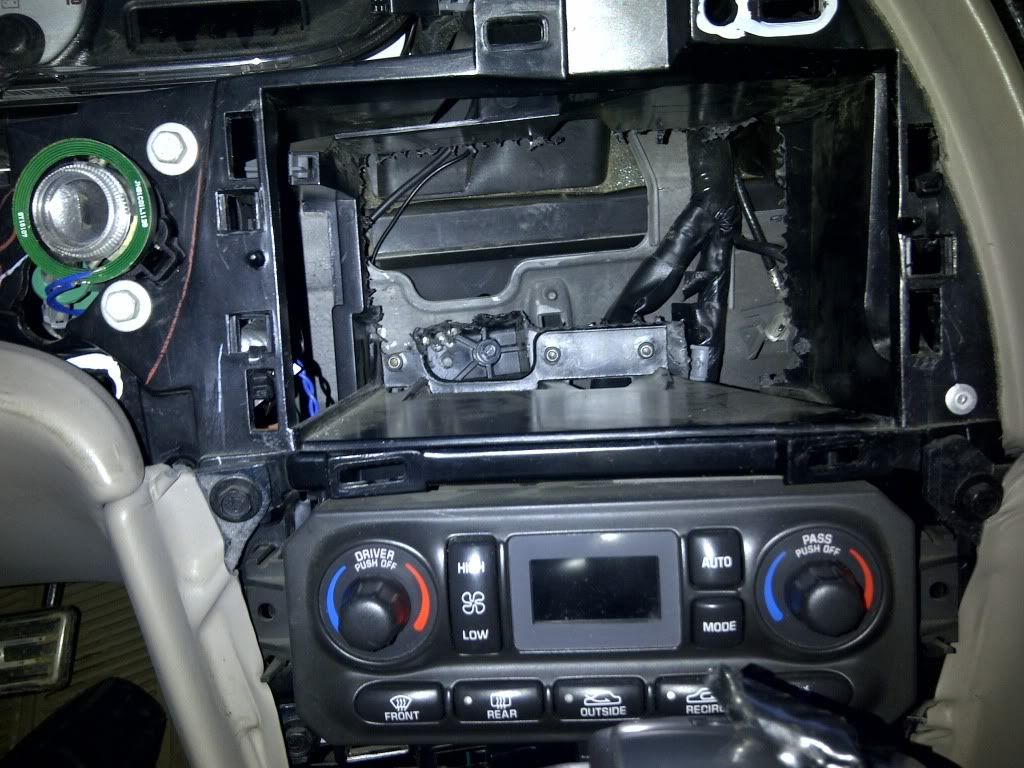
95-2009 is the right kit, the instructions are very poor. When i installed my first deck (pioneer) putting the screws in was a pain in the rear. so when i removed it i lost a screw and i used zip ties to mount the deck till i get screws the next day. I snoozed on it and kept the zip ties in for over 2 years lol there's no "right" way of doing it. you have to find your way around it. when you cut the back of the dash cavity, Take that grey harness and tuck it down behind the dash, then plug the GMOS-09 from the bottom (behind the HVAC controls, coming down from behind the traction button). To get a nice fit, you pretty much have to make sure there are no wires behind the deck, the dash is so small we barely have room for the HU itself. also trim the bottom of the dash cavity, it helps quite a bit on giving room for the wires
Do you have subs? and can you post a picture of the dash cavity and how you trimmed it? I might be able to help you a bit more if you post a picture. This way i can guide you and show you were else you need to trim.
rwebb616 wrote:I have the GMOS-09 harness kit and I was very impressed how quick and easy it was to connect up everything - they give you all the wires that you normally have to go hunt down. I initially had no audio and read through SamZ's thread and discovered that I had cut the wrong wire on the harness - the instructions with the harness say to cut one wire if you have 2000-2001 and the other wire if you have 2001-2005. This was incorrect - must be because of the Monsoon? Anyway I cut the opposite wire and reconnected the other one and I now have audio. The problem is the audio output is VERY weak. I have to turn the volume almost all the way up on the head unit to get it to a comfortable level. Anyone know what that is about?
The GMOS-09 is for Bose sound systems, i think metra and PAC think that Bose and Monsoon are wired the same way, which is incorrect.
I'm glad you got it going by cutting the same wire i cut before, it was very frustrating for me before and no one had it done before me on a GXP with monsoon.
Download this manual, and read the Troubleshooting section in the middle.

GMOS-09 Manual

Even the illustration they have there is wrong, the knob is no longer on the board itself, its actually located on the edge, right were i have that little red circle in this picture. DO NOT turn it too much, the volume will be way too loud when you turn your deck to 5 or 10, and its not as clear. unplug, turn a bit & test. and do it as needed. 25-35 should be the "normal" level, 35+ is were its "loud"

Image
rwebb616 wrote:My GPS in the receiver doesn't seem to be acquiring satellite signals. I mounted the antenna on the front center of the dash just in front of the defroster grille. I'm going to have to pull the wiring back out and test the system with it sitting on the seat and see if it's working - I don't know if I maybe pinched a wire or something.
I have mine mounted same spot as you and it works fine, maybe the signal is not strong in your area, try installing that little magnetic pad that comes with it, it helps quite a bit.
rwebb616 wrote:I cut the plastic piece out of the dash but I'm still having a hard time getting this head unit in far enough to be flush so it has that nice factory look.
as i mentioned above, please post a picture of your dash cavity to make sure you have it right, if not i can direct you to what more you need to trim, i would love to post mine but i'm way too far from home, I'm on holidays till July 28th or so.
rwebb616 wrote:Any help would be greatly appreciated! Let me know if you need any photos.
Update: It's only the HD Radio source that has low audio - the other sources have a volume adjust option in the settings and it's plenty loud after adjusting it higher. The radio is fixed for some reason - no gain adjustment. I can live with it though - if anyone has any suggestions though I'm open to them.
Thanks
-Rich
What you did is wrong, the sound level should be good at 0, pushing it up to 5 or 10 is only a bandage. I rather do things right than just get it going for the moment.

The adjust volume option in the HU works the same on CD/SD/Radio, but i dont think it effects the HD radio or navi sound. Again, you need to set the volume adjust option back to 0 and turn it up a tiny bit in the GMOS-09.

post any further questions here so it might be helpful for others when they need it. if i take too long to answer just shoot me a PM and i'll check this thread as soon as i can


All the best

Sammy K.
Re: Install project coming up soon!

Posted: Sat Jul 02, 2011 11:46 am
by SAMzGXP
looking thru my photobucket, i just found this. it might help

Image


see any wires? all tucked down

Re: Install project coming up soon!

Posted: Sun Jul 03, 2011 7:39 pm
by rwebb616
see any wires? all tucked down
Yes, that is how I did it too.. but then you have to feed the black connector, the white connector, the RCA connectors, the Mic connector, the GPS connector and the Antenna adapter (btw what did you do with that? I can't find a good spot for that) and plug them all into the radio with not much slack in the cables.

That is how I trimmed my dash as well - I may need to dremel out just a bit more to get it nice and open.

Also, the unit won't let me change any settings while moving - is there a bypass for that? Parking brake to ground or something? Very frustrating.. it will let you screw with the radio till your hearts content, but no... you can't actually enter something useful like a destination once you're moving.

I'll post some pics when I get a chance... only have my phone camera and no way to interface to the computer to transfer the images - I may be able to dig up a USB cable around here somewhere.

-Rich

Re: Install project coming up soon!

Posted: Sun Jul 03, 2011 8:14 pm
by SAMzGXP
what i did was i taped all the wires together except for the tip. I fed them from the bottom, right behind the traction control button.
once you do that you'll see the connectors on top. plug them in, and while pushing the deck in with one hand have the other hand pulling the wires back down (behind the HVAC). sorry not sure if it makes any sense but that's the best way i can explain it. If you wait i'll prolly do a video when i get back home.

As for the HU, you can ground the parking brake cable (bright green cable, usually very long). Ground it to any metal or even connect it to the black wire in the wiring harness and you'll have full access to the navi all the time. Please dont distract yourself and crash into a wall lol.

pics would be good, it would help a lot

Sammy K.

Re: Install project coming up soon!

Posted: Sun Jul 03, 2011 10:56 pm
by rwebb616
Okay - well I'm done screwing with it tonight. I have the console apart - took the shift lever out and i have all kinds of room under there tomorrow. I have to pull it back out of the dash now to redo the parking brake cable. I'm going to reroute the GPS cable back to the front (I was putting it in the back to test) and try the pad as you suggest. Tell me, did you fold all your extra gps cable together and put a tie on it? I'm just wondering if the cable can't be all bundled up because it's an antenna cable?

Also, what did you do with your antenna adapter cable? I can't seem to find a really good place to put that so that when I push the radio in it will feed back into the dash.

Man I appreciate your help! I've done many a stereo system and never have I had this much trouble getting it in. I did a single-din nav system with a slide out screen on my 2001 Bonneville before they had all the integration modules and I was able to get that all wired up. I have pictures of it, but in that case I had removed both seats and the console before I even started so that I had all the room I needed. Right now I'm at a cousin's house for the 4th of July celebration so I'm using his garage and his stuff - but my car needs to remain semi-driveable. I'm going to get back on it in the morning.

-Rich

Re: Install project coming up soon!

Posted: Mon Jul 04, 2011 10:59 am
by rwebb616
Okay - it's in the dash now finally... I had to pull the harness anyway because I needed to redo the parking wire so I taped up all the wires with electrical tape and it worked much better for getting it in.

Now I'm having a bunch of problems with my GPS antenna. It doesn't want to work right up in the front of the dash but if I pull out some wire and move it further forward on the dash it works fine.

Sam, I'm assuming you have an antenna on your windshield - the manual says that will interfere. I am watching the satellite status screen and they won't even lock in green (any of them) when the antenna is in the same place as yours. I'm wondering if I have a bad antenna. Also I didn't have a magnetic pad - mine is just double-sided tape. I'm thinking I'm going to reroute it to the back deck lid or something. I don't understand it though because if yours works it seems reasonable that mine should in the same place.

-Rich

Re: Install project coming up soon!

Posted: Mon Jul 04, 2011 7:36 pm
by SAMzGXP
Sorry for the late reply, but I didnt get the chance to reply earlier

As for the GPS, I know mine is working for sure. What happen when you try to use yours? it still didnt locate where you are?
I might be wrong on the bad and it might be from the NT1, not sure if the NT3 came with one, but i know it helps sometimes.
an another easier way might be the sunroof.
throw the GPS antenna on the roof, tuck in the wire all around the windshield, into the driver side behind the speedometer into the deck, thats how i had my bluetooth microphone done when i had the NT1, now i didnt install the mic on the NT3, so heres another weekend on the deck